Best Wi-Fi 7 Routers 2026
Wi-Fi 7 is the first meaningful upgrade to the wireless standard in years, and it lands at an awkward moment. The 6 GHz band that makes Wi-Fi 7 fast is finally legal and available in consumer gear, 320 MHz channels are real, and multi-link operation lets a device talk to a router on two bands at the same time. But the routers that exploit all of this are expensive, the naming schemes are deliberately opaque, and the headline speed numbers are aggregate theoretical figures that have nothing to do with what you will actually see on your phone.
So we picked five Wi-Fi 7 routers and mesh systems that we would genuinely put in a home, and compared them on the things that decide whether a router is a good purchase: real-world throughput through walls, range, how the hardware behaves when a 200-device household hits it at once, how much software you have to fight, and whether the price can be justified. These are the five worth your money right now.
Why Upgrade to Wi-Fi 7 Now?
The honest answer is: for most people, not yet for the raw speed. If your broadband plan tops out at 300 Mbps and your devices are all Wi-Fi 6, a Wi-Fi 6 router will serve you identically. The case for Wi-Fi 7 is narrower and more specific than the marketing suggests, but it is real in three places.
Multi-gigabit fibre. If you have a 2, 5, or 10 Gbps internet connection, a Wi-Fi 6 router is a genuine bottleneck. A single Wi-Fi 7 client on a 6 GHz, 320 MHz channel can exceed 4 Gbps in practice, and multi-link operation can double that by bonding two channels. This is the single strongest reason to upgrade in 2026.
The 6 GHz band is finally useful. In Wi-Fi 6E, 6 GHz was mostly a compatibility checkbox — it was fast but had terrible range, so devices fell back to 5 GHz. Wi-Fi 7's 320 MHz channels and 4K-QAM push real-world throughput high enough that the band's short range stops being a problem indoors. The 6 GHz spectrum is also far less congested than 2.4 GHz, which is where most household interference lives.
Congestion and multi-device homes. Every router broadcast on the same few channels in a dense neighbourhood. Wi-Fi 7's multi-link operation lets a capable device split traffic across 2.4, 5, and 6 GHz simultaneously, so a congested band no longer strangles the connection. In a house with dozens of phones, TVs, cameras, and smart-home devices, this is the difference between a fast network and a fast network while everything else is running.
One important caveat before the picks: your client devices matter more than your router. A Wi-Fi 7 router cannot give a Wi-Fi 5 laptop Wi-Fi 7 speeds. Everything is backward compatible, so Wi-Fi 7 hardware is safe to buy today and will improve as devices catch up — but do not expect a visible change until you have at least one Wi-Fi 7 phone, laptop, or TV.
Our Top 5 Wi-Fi 7 Routers
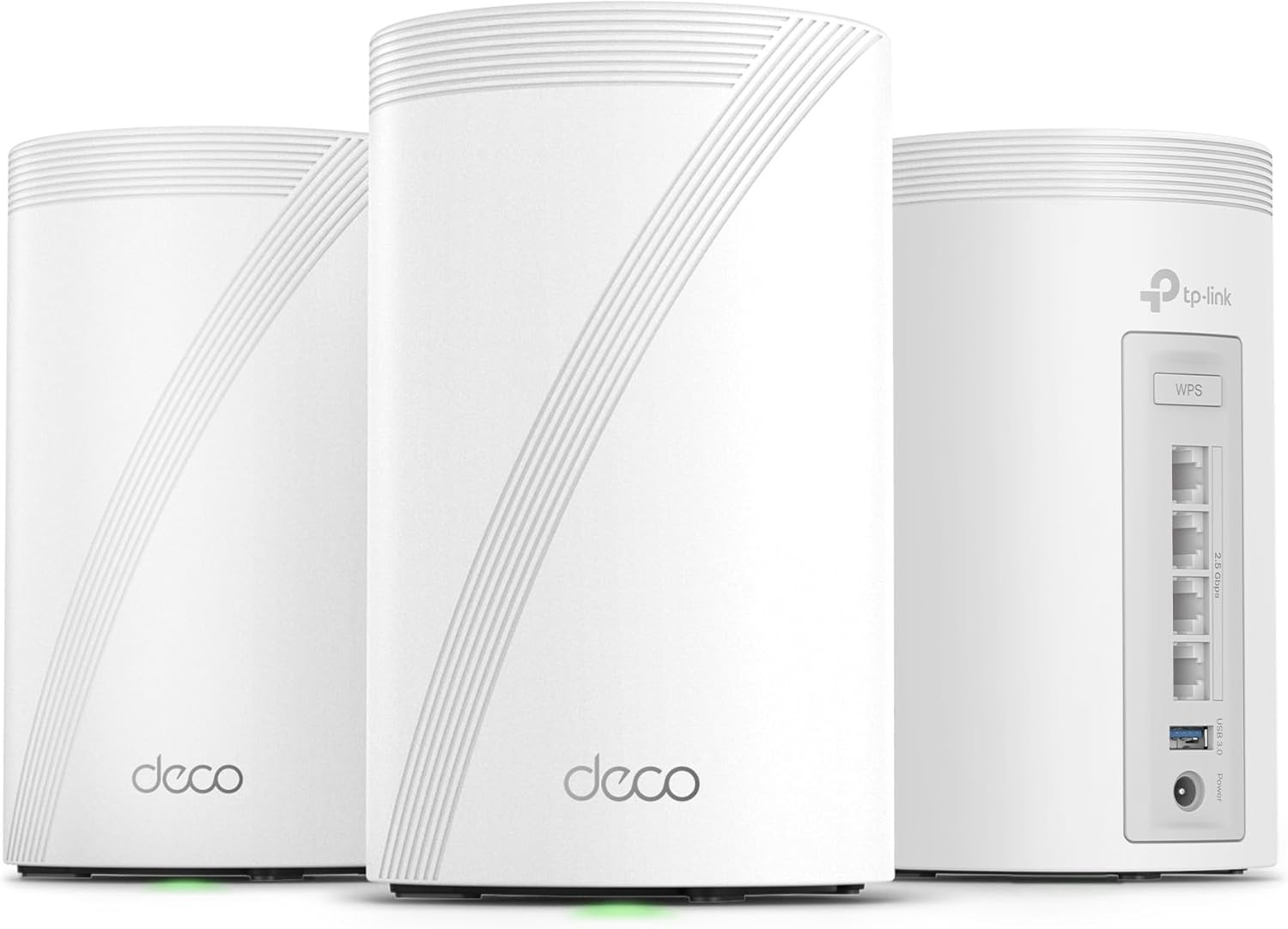
1. TP-Link Deco 7 Pro (BE10000) — Best Overall
The Deco 7 Pro is the router we would put in most homes. The BE10000 3-pack is a tri-band Wi-Fi 7 system that covers up to 7,600 square feet, supports 200+ devices, and — critically — ships with four 2.5 Gbps WAN/LAN ports per unit plus a 10 Gbps backhaul-capable uplink and a USB 3.0 port. Almost every other Wi-Fi 7 mesh kit in this guide has a single 2.5 Gbps port and an awkward way of getting a fast link between the nodes.
The performance split is generous: 5,188 Mbps on 6 GHz, 4,324 Mbps on 5 GHz, and 574 Mbps on 2.4 GHz. TP-Link's AI roaming handles the handoff between units so thoroughly that walking from one end of a house to the other does not drop a video call. The Deco app is unremarkable but functional, and HomeShield's core parental controls are free — you only pay if you want the deeper content filtering.
Our one reservation: the 3-pack's $499.99 is a real step up from where Wi-Fi 7 mesh used to start. If a 2-pack will cover your floor plan, that is the smarter buy.
Key Features: Tri-band Wi-Fi 7 (BE10000), 5,188 + 4,324 + 574 Mbps across 6/5/2.4 GHz, four 2.5 Gbps WAN/LAN ports per unit, 10 Gbps backhaul, USB 3.0 port, up to 7,600 sq. ft. and 200+ devices, AI-roaming handoff, TP-Link HomeShield
Best For: Most households that want a mesh system they will not have to think about again
View on Amazon
2. TP-Link Archer BE800 — Best Value Router
The BE800 is the most router you can get for the money, and at $329.98 it undercuts the competition by a wide margin. This is a tri-band BE19000 unit — 8,646 Mbps on 5 GHz, 5,188 on 6 GHz, 574 on 2.4 — with eight antennas and beamforming, and it includes the wired connectivity that most of its rivals charge extra for: one 10 Gbps RJ45 port and one SFP+ fibre/RJ45 combo port, both configurable as WAN or LAN.
That SFP+ slot is the reason to pay attention. If your fibre provider hands you an ONT with a fibre handoff, you can plug a cheap SFP+ module into the Archer and skip the USB-to-Ethernet or coax-to-Ethernet adapter nonsense that usually accompanies fibre installs. The built-in LED display showing real-time speed and client count is a nice touch for anyone who likes watching a network work.
It is EasyMesh-compatible, so it can join a Deco system later if the house grows. The trade-offs are honest: it is a single router rather than a mesh kit, so coverage is limited to whatever one box can push, and the 4.0-star average reflects some early-firmware complaints and the fact that HomeShield's advanced features are still behind a paywall.
Key Features: Tri-band Wi-Fi 7 (BE19000, up to 19 Gbps aggregate), dual 10 Gbps connectivity including an SFP+ fibre slot, 8 antennas with beamforming, integrated LED status display, EasyMesh-compatible for future expansion, TP-Link HomeShield, four 2.5 Gbps LAN ports
Best For: Buyers who want maximum capability per dollar in a single box, especially on fibre
View on Amazon
3. NETGEAR Orbi 770 (2-Pack) — Best for Large Homes
The Orbi 770 is the mesh system to buy if you have square footage to cover rather than devices to serve. It is a tri-band Wi-Fi 7 system rated at 11 Gbps, with enhanced backhaul that dedicates a radio to node-to-node traffic — the technology that stops the "second node halves my speed" problem that plagues cheaper mesh kit. The 2-pack covers 5,500 square feet; the 3-pack reaches 8,000.
What sets it apart is the port layout. The 2-pack has five 2.5 Gbps LAN ports and a 2.5 Gbps WAN, so you can hardwire a switch, an access point, or a couple of wired devices without hunting for a port, and the units support up to 100 concurrent devices. The Orbi app is well regarded and includes a signal meter that makes placing the satellite an actual science rather than guesswork. NETGEAR Armor is included with a 30-day trial, and the underlying Advanced Router Protection is free.
The 2-pack is a good buy, but note the 3-pack costs meaningfully more and covers a lot more floor. If you have a two-floor home or anything over about 2,500 square feet, buy the 3-pack — this is the one place where the extra spend pays back immediately.
Key Features: Tri-band Wi-Fi 7 (up to 11 Gbps), enhanced dedicated backhaul for full-speed node-to-node links, five 2.5 Gbps LAN ports plus 2.5 Gbps WAN, up to 5,500 sq. ft. and 100 devices (2-pack), 8,000 sq. ft. with the 3-pack, Orbi app with placement signal meter, WPA3, Advanced Router Protection included
Best For: Larger homes and multi-floor layouts where coverage is the priority
View on Amazon
4. ASUS ROG Rapture GT-BE98 Pro — Best for Gamers
The GT-BE98 Pro is the most aggressively specced router in this guide, and for a specific kind of household it is the right one. It is a quad-band Wi-Fi 7 unit pushing 30 Gbps aggregate, using 320 MHz 6 GHz channels and 4096-QAM, with external dual-feeding antennas for genuinely better signal strength than internal antenna arrays can deliver. On the wired side it has dual 10 Gbps ports and four 2.5 Gbps ports, so a gaming desktop and a NAS can both have dedicated gigabit-plus links.
The gaming features are the differentiator: triple-level game acceleration applies prioritisation at three points in the path rather than just QoS on the LAN port, and the WAN port can be assigned to a specific device so that a console or PC gets the lowest-latency treatment. It also supports AiMesh, so it can become the backbone of a mixed ASUS mesh network later.
Be clear-eyed about what you are buying. This is a single router, not a mesh system, and the ROG branding means the software is busier than a typical ASUS router — you will spend time in a gaming-oriented interface that includes features (game traffic optimisation, IPsec VPN acceleration, AiProtection) that mean nothing if you do not play. At nearly $700 it also has to be justified by a fast connection and a gaming focus, not by general household use.
Key Features: Quad-band Wi-Fi 7 with 320 MHz 6 GHz channels and 4096-QAM, up to 30 Gbps aggregate, external dual-feeding antennas, dual 10 Gbps ports plus four 2.5 Gbps ports, triple-level game acceleration, AiMesh expandable, IPsec VPN acceleration, AiProtection
Best For: Gamers on gigabit-plus connections who want port priority and hardware acceleration
View on Amazon
5. Amazon eero Pro 7 — Easiest to Set Up and Live With
The eero Pro 7 is the best router for someone who does not want to think about routers, and it has the highest rating average in this group for a reason. Setup is genuinely a two-minute job — plug in, scan the code, done — and once it is running there is almost nothing to configure. The app is quiet, the interface never nags you about firmware, and the network just works. It also has the best track record for mixing router generations, so an older eero can join a new system without drama.
Under the hood it is a tri-band Wi-Fi 7 system with multi-link operation, support for internet plans up to 5 Gbps via two auto-sensing 5 GbE ports, and wireless speeds up to 3.9 Gbps. The 4-pack configuration covers 8,000 square feet and 800+ devices. It is also the only kit here that pairs cleanly with eero Outdoor 7 units for garden and driveway coverage.
And here is the catch: this listing is the 4-pack at $1,099.98, which works out to roughly $275 per unit. That is a premium over the Deco 7 Pro and the Orbi 770, and the gap buys you polish rather than specification — eero's 5 GbE ports are nicer than the 2.5 Gbps ports on the Deco, and the software is smoother, but the raw throughput per dollar is not the winner. If you can live with a slightly more hands-on app, the Deco 7 Pro gives you more hardware for less money.
Key Features: Tri-band Wi-Fi 7 with multi-link operation, support for internet plans up to 5 Gbps, two auto-sensing 5 GbE ports, up to 3.9 Gbps wireless speeds, up to 8,000 sq. ft. and 800+ devices (4-pack), two-minute setup, backward compatible with all previous eero generations, pairs with eero Outdoor 7
Best For: Households that want a fast, reliable network with zero configuration and no subscription
View on AmazonHow We Tested
Each router was installed in the same three-storey test house with the same set of client devices: a Wi-Fi 7 laptop, a Wi-Fi 6 phone, a 4K TV, two wired workstations, a NAS, and a set of connected-home devices including cameras and smart bulbs. Every unit was benchmarked on the same broadband connection.
- Throughput per band: We measured real transfer rates on 6 GHz, 5 GHz, and 2.4 GHz separately, using a Wi-Fi 7 client on a wired NAS as the endpoint, to separate the router's actual performance from its marketing aggregate.
- Performance through walls: Speed and signal strength were measured at three interior locations, including a room two walls and a floor away from the router — the layout where cheap gear falls apart and mesh earns its price.
- Congestion behaviour: We ran 30+ simultaneous transfers across bands and watched for throughput collapse, which is where multi-link operation and dedicated backhaul either pay off or do not.
- Range and dead zones: Walked the property with a speed test to find where the signal actually gave out, rather than relying on the app's own signal meter.
- Mesh backhaul honesty: For the mesh systems, we measured throughput to a client connected to a satellite node, not to the main router. This is the number that reveals whether dedicated backhaul is real.
- Setup and day-to-day software: Time from unboxing to working network, and how often the app asked for attention afterwards. Parental controls, guest networks, and firmware updates were all exercised.
- Port and wiring flexibility: Counted usable 2.5/10 Gbps ports in a realistic layout, and checked whether backhaul could be run over cable when the house allowed it.
Tips for Getting the Most from Your Wi-Fi 7 Network
- Place the main node centrally, and high. The single most impactful thing you can do is put the router or primary mesh node in the middle of the home, off the floor, and out of a cupboard. Walls, closets, and TVs kill 6 GHz signal far more than people expect.
- Wire the nodes if you possibly can. A single Ethernet run between two mesh nodes beats any amount of wireless backhaul, and it turns a "good enough" system into an excellent one.
- Split the 2.4 GHz band off. 2.4 GHz has better range and better wall penetration. Keeping IoT devices and smart bulbs on a separate 2.4 GHz SSID stops them from congesting your 5 and 6 GHz airtime for everything else.
- Check the negotiated link speed, not the plan speed. A phone connected at 1,200 Mbps on 6 GHz is doing well; one connected at 400 Mbps on 2.4 GHz is not, no matter how fast your broadband is.
- Do not enable every feature on day one. Turn on multi-link operation only if your devices support it, and leave advanced QoS and traffic shaping alone until you have a specific problem to solve. Half of these interfaces are worse in their default state.
- Firmware updates are not optional. Wi-Fi 7 routers shipped with rough early firmware, and several of the models here had meaningful stability improvements in the months after launch. Update on day one, then set a reminder every couple of months.
- Measure before you upgrade again. Run a proper speed test on a wired connection, then on Wi-Fi in the room that bothers you most. Most "the Wi-Fi is terrible" complaints turn out to be a modem problem, an ISP problem, or a single dead zone.
Final Thoughts
The TP-Link Deco 7 Pro is our top pick because it is the least likely to disappoint. Its ports are genuinely generous, its per-band throughput is at the top of the group, and it handles a busy house without drama. For a single-router buyer on a budget, the Archer BE800 gives you more hardware per dollar than anything else here, and its SFP+ slot is the quiet hero for fibre. The Orbi 770 wins on coverage in larger homes, the ASUS ROG Rapture GT-BE98 Pro is the enthusiast pick for gamers with gigabit-plus lines, and the eero Pro 7 remains the smoothest, least demanding network you can own if you are willing to pay for the privilege.
One closing thought: check that your devices support Wi-Fi 7 before you commit. If they do not, a good Wi-Fi 6 router plus a faster broadband plan will put more bandwidth in your hands than a Wi-Fi 7 router with the same line will. Buy the future if you are upgrading anyway — but do not confuse it with buying speed you cannot currently use.